TibiOS PRO AI Network
TibiOS PRO AI Network
Turns a building into Frontier AI infrastructure. (advanced alternative)
Convierte un edificio en infraestructura de IA Frontier (alternativa avanzada)
TibiOS Private AI Network is an alternative mode for users who need to take AI usage far beyond a conventional experience.
It is designed for companies, professional teams and demanding user communities that need to work intensively with Frontier models and want the highest possible inference speed and capacity, without depending solely on a single machine or on cloud services.
TibiOS connects multiple TibiBoxes through a private, high-speed network and distributes the Experts of MoE models across the different nodes. This way, the infrastructure can grow by adding compute and memory capacity wherever it's needed.
It isn't meant to replace the usual TibiOS experience: it's an advanced mode for those who need higher speed and intensive use.
More capacity. More speed. More AI.
A new way to build private AI infrastructure for the most demanding users.
TibiOS Private AI Network es una modalidad alternativa para los usuarios que necesitan llevar la utilización de la IA mucho más allá de una experiencia convencional.
La propuesta está pensada para empresas, equipos profesionales y comunidades de usuarios exigentes que necesitan trabajar intensivamente con modelos Frontier y buscan la mayor velocidad y capacidad de inferencia posible, sin depender exclusivamente de una única máquina o de la Red de Internet convencional.
TibiOS conecta múltiples TibiBox mediante una red privada de alta velocidad y distribuye los Experts de modelos MoE entre los diferentes nodos. De esta forma, la infraestructura puede crecer añadiendo capacidad de cómputo y memoria allí donde sea necesario.
No pretende sustituir la experiencia habitual de TibiOS: es una modalidad avanzada para quienes necesitan mayor velocidad y uso intensivo.
Más capacidad. Más velocidad. Más IA.
Una nueva forma de construir infraestructura privada de IA para los usuarios más
exigentes.
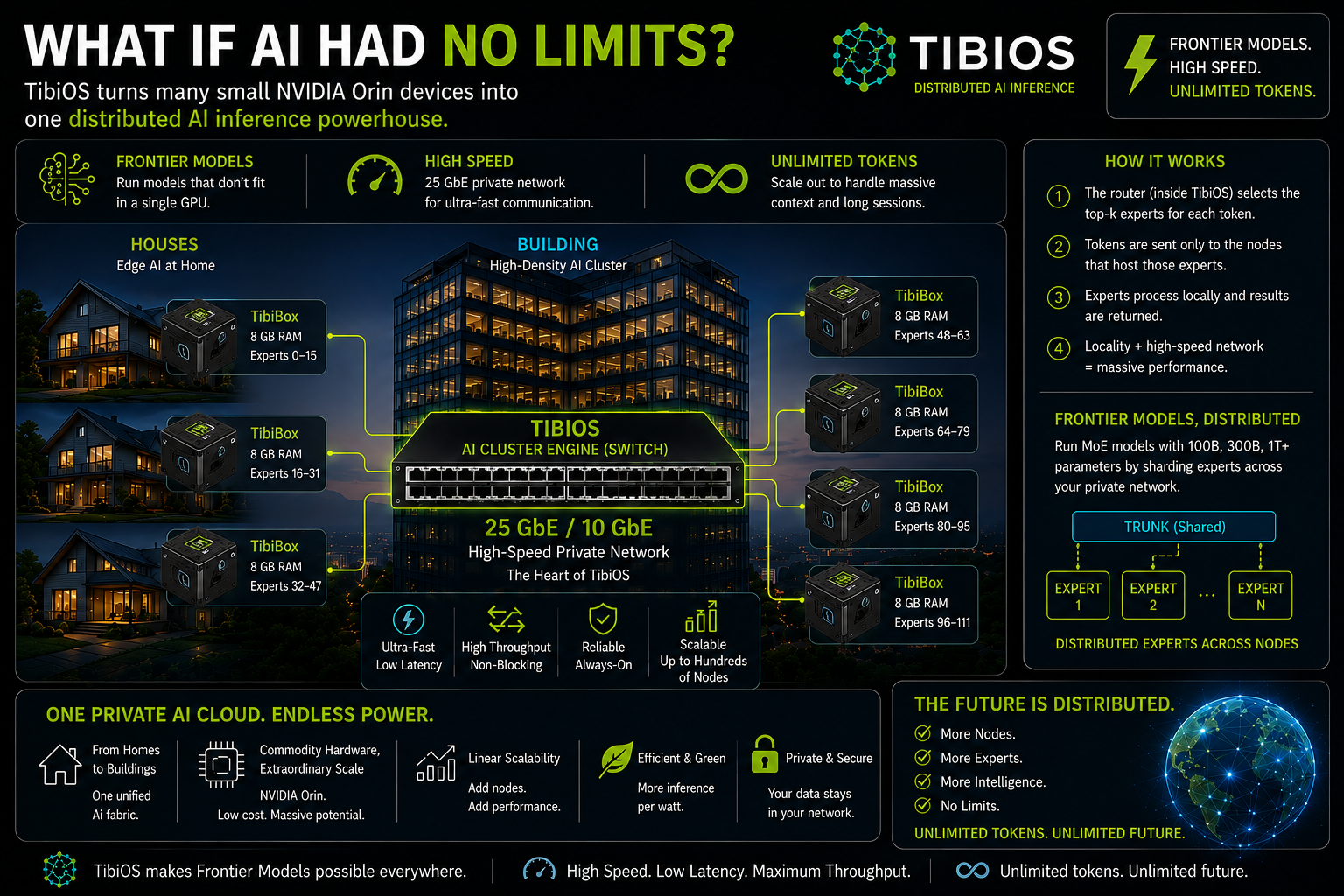
TibiOS lets you connect houses, offices and entire buildings into a private computing network, turning many small GPUs into a single distributed AI Cluster. Instead of needing one giant GPU to run a Frontier model, TibiOS distributes its MoE model Experts across the different nodes and uses a high-speed switch to coordinate inference traffic. More nodes → more AI capacity. The infrastructure can grow from a few machines in a building to hundreds of distributed GPUs, while models and their data stay inside a private network.
The idea: your building becomes a distributed GPU. TibiOS automatically manages routing, placement, memory, load and communication between nodes, keeping the most-used Experts close to where they're needed. The result is a private infrastructure capable of offering access to Frontier models, high inference speed and virtually unlimited capacity by adding new nodes, without depending on a single, enormously expensive GPU.
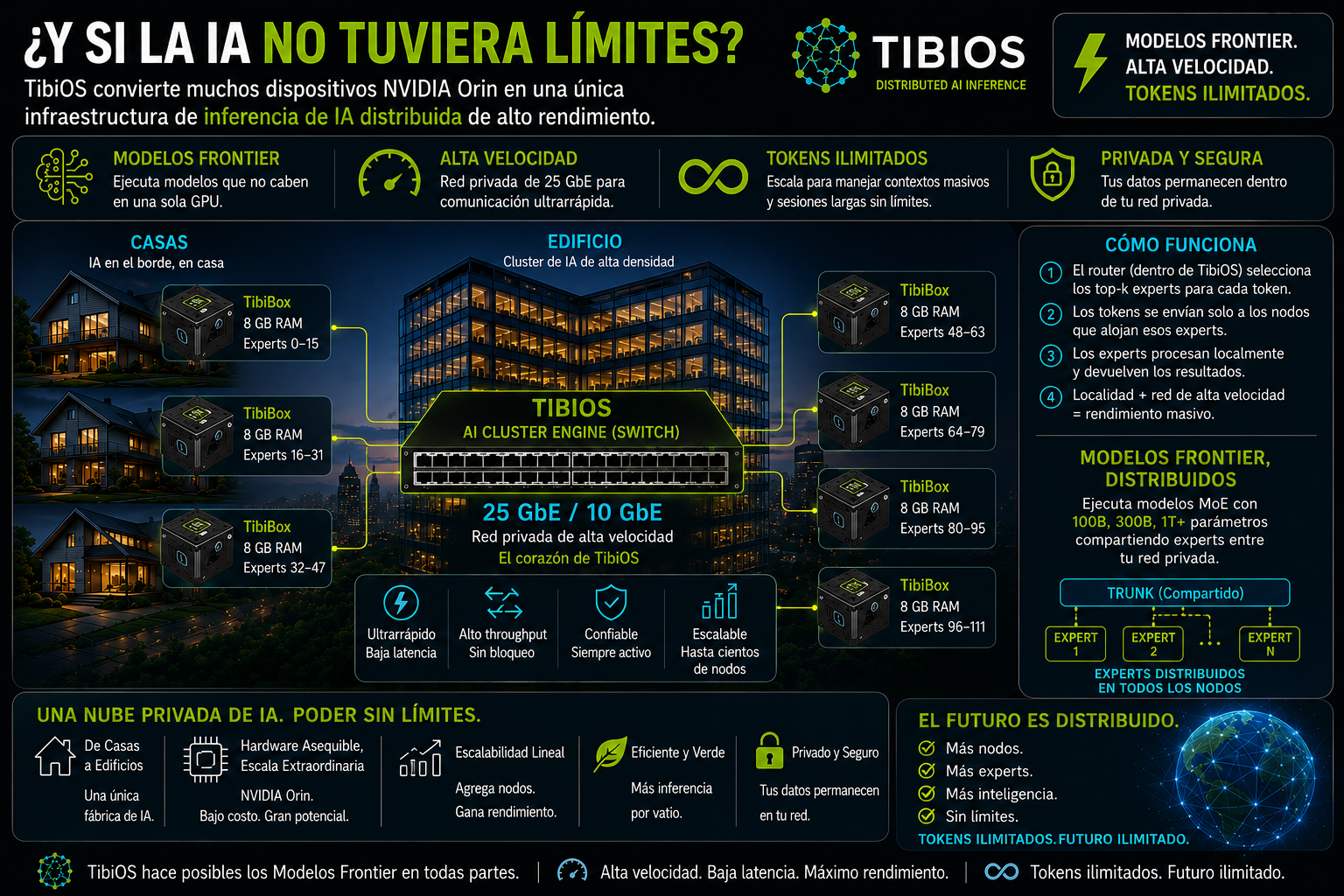
TibiOS permite conectar casas, oficinas y edificios completos en una red privada de computación, convirtiendo múltiples GPUs pequeñas en un único AI Cluster distribuido. En lugar de necesitar una GPU gigantesca para ejecutar un modelo Frontier, TibiOS distribuye sus Experts de modelos MoE entre los distintos nodos y utiliza un switch de alta velocidad para coordinar el tráfico de inferencia. Más nodos → más capacidad de IA. La infraestructura puede crecer de unas pocas máquinas en un edificio a cientos de GPUs distribuidas, manteniendo los modelos y sus datos dentro de una red privada.
La idea: tu edificio se convierte en una GPU distribuida. TibiOS gestiona automáticamente el routing, placement, memoria, carga y comunicación entre nodos, buscando mantener los Experts más utilizados cerca de donde se necesitan. El resultado es una infraestructura privada capaz de ofrecer acceso a modelos Frontier, alta velocidad de inferencia y capacidad prácticamente ilimitada mediante la incorporación de nuevos nodos, sin depender de una única GPU de enorme costo.
One network. Many GPUs. One AI cluster.
Una red. Muchas GPUs. Un cluster de IA.
TibiOS PRO AI Network — Technical Detail
TibiOS PRO AI Network — Detalle técnico
Expert Sharding
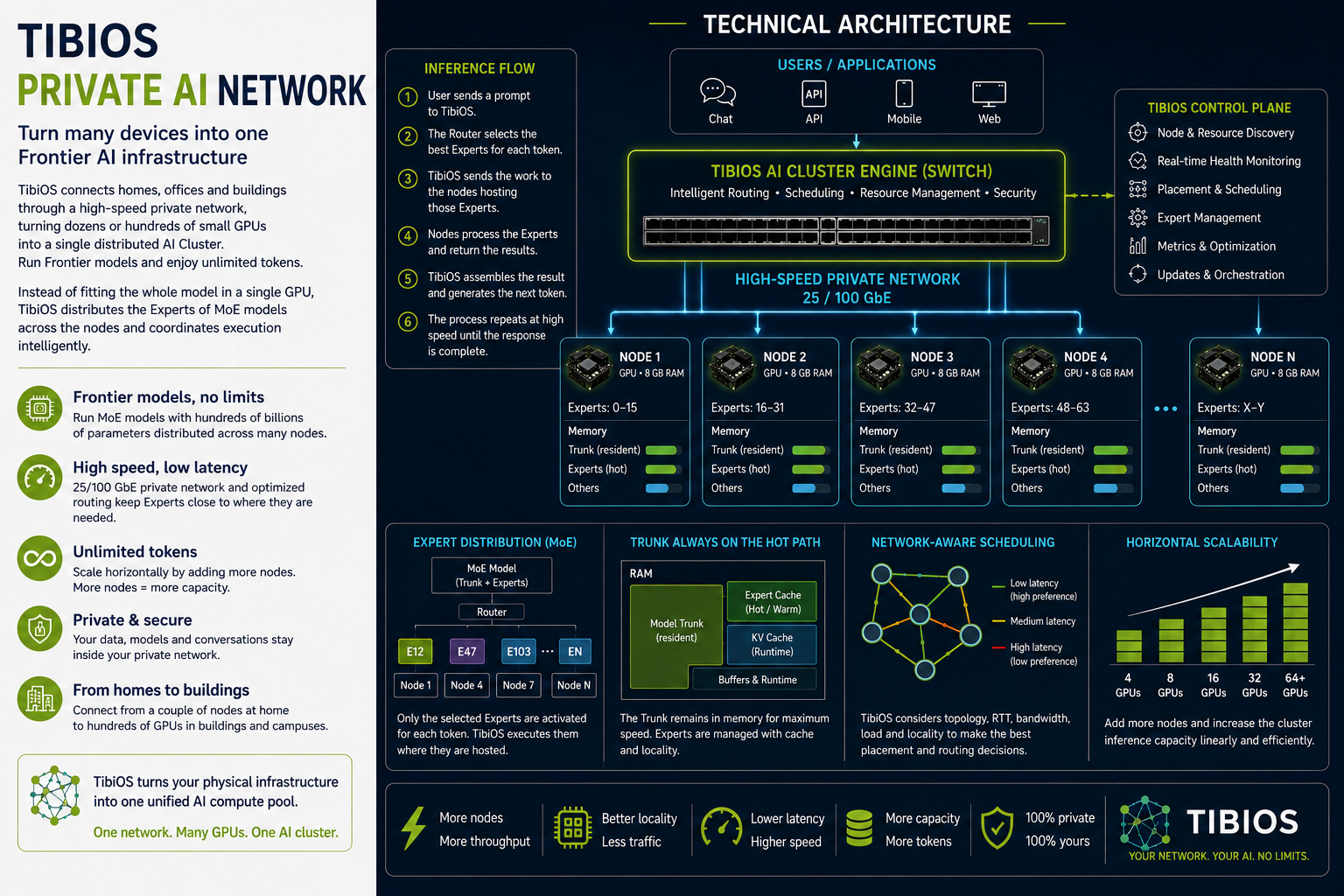
In an MoE model, not every parameter takes part in each token. A router selects a small subset of Experts for every token. TibiOS takes advantage of this property by distributing the Experts across the different nodes in the cluster. Each node holds a shard of the Expert set, and the system dynamically determines where each selected Expert lives.
Token → Router → Expert IDs → Node IDs → Network Route → Expert Execution → Result
This way, the model's total capacity can be far greater than the memory of any single node.
TibiOS AI Cluster Engine
The TibiOS AI Cluster Engine acts as the cluster's intelligent coordination layer. It keeps a global view of the available resources and makes routing, scheduling and placement decisions. Among other parameters, the scheduler can be aware of:
- GPU and compute capacity of each node
- Available memory
- Experts resident on each node
- Expert cache state
- Current GPU load
- Network topology
- Available bandwidth
- Latency between nodes
- Historical routing locality
This lets Expert placement account for compute, memory and communication cost at the same time.
Trunk Residency
The model's trunk has a different access pattern than the Experts: every token walks through its layers in the same order, so a conventional LRU cache isn't well suited to managing a trunk that doesn't fully fit in memory. TibiOS uses a fixed-pinning model whenever possible — resident layers stay in memory, while the rest can use secondary storage as a streaming mechanism, so the trunk doesn't become a constant per-token I/O stream. When the model and the hardware allow it, the ideal architecture keeps the trunk fully resident in RAM/VRAM and reserves storage for non-resident Experts.
Expert Cache
Unlike the trunk, Experts can benefit from caching mechanisms because their usage depends on routing. Frequently used Experts can stay resident in memory, while others live on secondary storage and load on demand. The effectiveness of this mechanism depends fundamentally on routing locality: the higher the probability that upcoming tokens reuse already-resident Experts, the higher the hit rate and the lower the storage traffic. That's why TibiOS treats Expert locality as a core variable for distributed scheduling.
Network-Aware Scheduling
In a distributed architecture, the network is part of the inference system. TibiOS can jointly consider:
- Compute cost
- Memory capacity
- Expert locality
- Bandwidth
- RTT (round-trip time)
- Node load
- Proximity within the network topology
This avoids placements that generate unnecessary traffic and favors co-locating Experts with related usage patterns within the same network domain. The infrastructure can use high-speed Ethernet — 10, 25 or 100 GbE — depending on scale and hardware.
Communication and Batching
The main challenge of a distributed MoE architecture is preventing inter-node communication from dominating inference time. TibiOS is designed to group operations headed to the same node and process them through batching whenever possible. Instead of performing multiple individual communications per token, the system can group tokens headed to the same Experts and minimize the number of network exchanges. This amortizes latency and increases effective GPU utilization.
Horizontal Scalability
Cluster capacity grows by adding nodes. Each new node simultaneously contributes:
- GPU capacity
- Memory
- Expert cache capacity
- Storage
- Aggregate inference capacity
However, TibiOS does not assume linear scalability. The scheduler's goal is to maximize scaling efficiency, accounting for both compute and communication. The key metric is the ratio between the throughput actually achieved and the theoretical throughput expected when adding new nodes.
Private AI Fabric
The architecture can be deployed inside a home, an office, a building, a campus or a private infrastructure. Nodes form a distributed pool of AI resources, while TibiOS abstracts away the complexity of deciding where Experts live, where to run each operation, and how to use the available resources. The infrastructure can grow progressively from a handful of nodes to clusters of dozens or hundreds of GPUs.
The TibiOS Architecture
TibiOS's core proposition isn't simply connecting GPUs. It's building an infrastructure layer capable of treating compute, memory, Experts and network as a single distributed resource. This enables a new way to scale inference: instead of buying an ever-larger GPU, add small nodes to a private network and intelligently distribute the model's capacity across them. The end goal is to turn many small GPUs into a single logical inference platform, capable of running Frontier models and increasing aggregate throughput by adding new nodes.
Expert Sharding
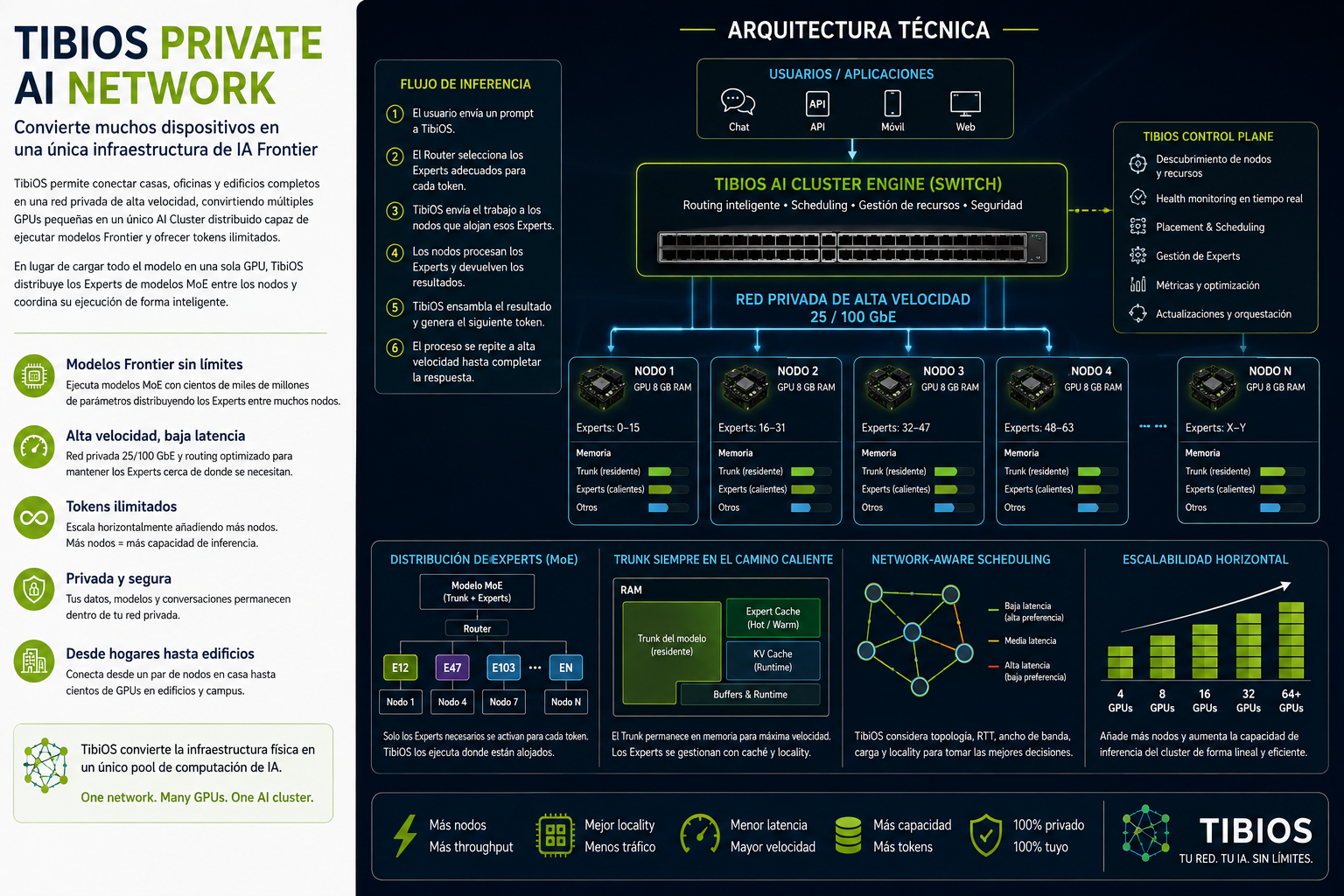
En un modelo MoE, no todos los parámetros participan en cada token. Un router selecciona un pequeño subconjunto de Experts para cada token. TibiOS aprovecha esta propiedad distribuyendo los Experts entre los distintos nodos del cluster. Cada nodo aloja un fragmento del conjunto de Experts, y el sistema determina dinámicamente dónde reside cada Expert seleccionado.
Token → Router → Expert IDs → Node IDs → Network Route → Expert Execution → Result
De esta forma, la capacidad total del modelo puede ser muy superior a la memoria de un único nodo.
TibiOS AI Cluster Engine
El TibiOS AI Cluster Engine actúa como la capa de coordinación inteligente del cluster. Mantiene una visión global de los recursos disponibles y toma las decisiones de routing, scheduling y placement. Entre otros parámetros, el scheduler puede tener en cuenta:
- Capacidad de GPU y de cómputo de cada nodo
- Memoria disponible
- Experts residentes en cada nodo
- Estado de la cache de Experts
- Carga actual de la GPU
- Topología de la red
- Ancho de banda disponible
- Latencia entre nodos
- Localidad histórica de routing
Esto permite que el placement de Experts tenga en cuenta simultáneamente el coste de cómputo, de memoria y de comunicación.
Trunk Residency
El trunk del modelo tiene un patrón de acceso distinto al de los Experts: cada token recorre sus capas en el mismo orden, por lo que un LRU convencional no es adecuado para gestionar un trunk que no cabe por completo en memoria. TibiOS utiliza un modelo de pinning fijo siempre que es posible — las capas residentes permanecen en memoria, mientras que el resto puede usar almacenamiento secundario como mecanismo de streaming, evitando que el trunk se convierta en un flujo constante de I/O por token. Cuando el modelo y el hardware lo permiten, la arquitectura ideal mantiene el trunk completamente residente en RAM/VRAM y reserva el almacenamiento para los Experts no residentes.
Expert Cache
A diferencia del trunk, los Experts sí pueden beneficiarse de mecanismos de caching porque su uso depende del routing. Los Experts más utilizados pueden permanecer residentes en memoria, mientras que otros viven en almacenamiento secundario y se cargan bajo demanda. La efectividad de este mecanismo depende fundamentalmente de la localidad del routing: cuanto mayor sea la probabilidad de que los próximos tokens reutilicen Experts ya residentes, mayor será el hit rate y menor el tráfico de almacenamiento. Por eso TibiOS trata la localidad de Experts como una variable central del scheduling distribuido.
Network-Aware Scheduling
En una arquitectura distribuida, la red forma parte del sistema de inferencia. TibiOS puede considerar de forma conjunta:
- Coste de cómputo
- Capacidad de memoria
- Localidad de Experts
- Ancho de banda
- RTT (round-trip time)
- Carga de los nodos
- Proximidad dentro de la topología de red
Esto evita placements que generan tráfico innecesario y favorece la co-ubicación de Experts con patrones de uso relacionados dentro del mismo dominio de red. La infraestructura puede utilizar Ethernet de alta velocidad — 10, 25 o 100 GbE — según la escala y el hardware disponible.
Comunicación y batching
El principal reto de una arquitectura MoE distribuida es evitar que la comunicación entre nodos domine el tiempo de inferencia. TibiOS está diseñado para agrupar operaciones dirigidas al mismo nodo y procesarlas mediante batching siempre que sea posible. En lugar de realizar múltiples comunicaciones individuales por token, el sistema puede agrupar los tokens destinados a los mismos Experts y minimizar el número de intercambios de red. Esto amortiza la latencia y aumenta la utilización efectiva de la GPU.
Escalabilidad horizontal
La capacidad del cluster crece añadiendo nodos. Cada nuevo nodo aporta simultáneamente:
- Capacidad de GPU
- Memoria
- Capacidad de cache de Experts
- Almacenamiento
- Capacidad de inferencia agregada
Sin embargo, TibiOS no asume una escalabilidad lineal. El objetivo del scheduler es maximizar la eficiencia del escalado, teniendo en cuenta tanto el cómputo como la comunicación. La métrica clave es la relación entre el throughput realmente alcanzado y el throughput teórico esperado al añadir nuevos nodos.
Private AI Fabric
La arquitectura puede desplegarse dentro de una casa, una oficina, un edificio, un campus o una infraestructura privada. Los nodos forman un pool distribuido de recursos de IA, mientras TibiOS abstrae la complejidad de decidir dónde viven los Experts, dónde ejecutar cada operación y cómo usar los recursos disponibles. La infraestructura puede crecer progresivamente desde un puñado de nodos hasta clusters de decenas o cientos de GPUs.
La arquitectura TibiOS
La propuesta central de TibiOS no es simplemente conectar GPUs. Es construir una capa de infraestructura capaz de tratar el cómputo, la memoria, los Experts y la red como un único recurso distribuido. Esto habilita una nueva forma de escalar la inferencia: en lugar de comprar una GPU cada vez más grande, añadir pequeños nodos a una red privada y distribuir inteligentemente la capacidad del modelo entre ellos. El objetivo final es convertir muchas GPUs pequeñas en una única plataforma lógica de inferencia, capaz de ejecutar modelos Frontier y aumentar su throughput agregado mediante la incorporación de nuevos nodos.
TibiOS Private Network
TibiOS Private Network
A high-speed private network for distributed AI
Una red privada de alta velocidad para IA distribuida
TibiOS Private Network makes it possible to deploy a private network infrastructure that connects TibiBoxes and other TibiOS nodes with low latency and high bandwidth, without interfering with each user's regular Internet connection.
The architecture separates two types of traffic:
- Internet traffic: keeps using the user's router and connection as usual.
- AI traffic: flows over a private network optimized for TibiOS, dedicated to node-to-node communication, distributed inference, Expert caches and future distributed model deployments.
This separation makes it possible to build an AI network inside a building, home, office, campus or multi-apartment installation.
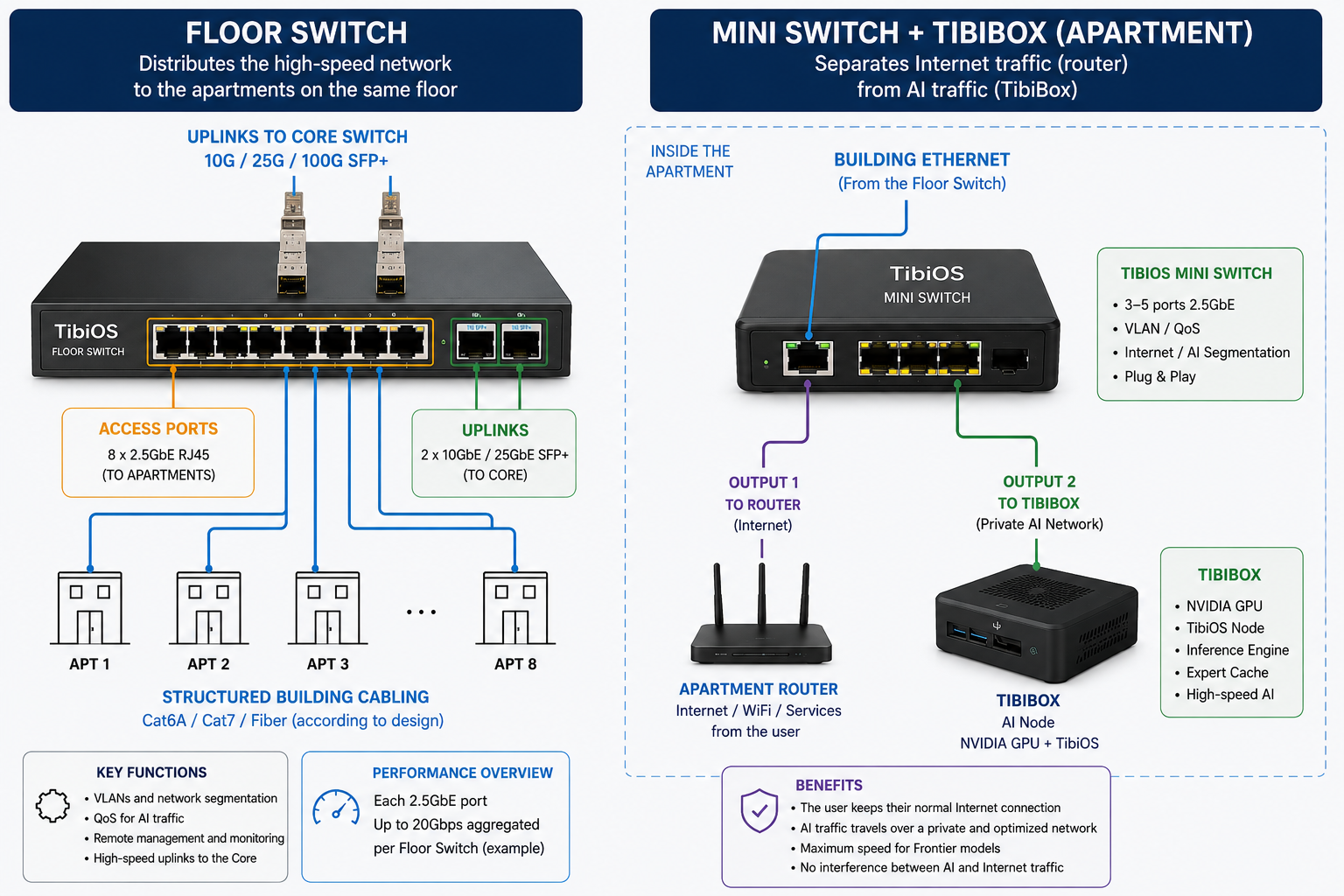
How it works
The infrastructure is split into two main tiers:
1. TibiOS Floor Switch
The Floor Switch distributes the high-speed network from the Core to the different apartments on a floor. Each apartment can have a dedicated 2.5GbE connection to the floor switch.
The Floor Switch includes:
- 8 × 2.5GbE RJ45 ports for the apartments
- 2 × SFP+ 10/25GbE uplinks to the Core
- VLANs for network segmentation
- QoS to prioritize AI traffic
- Remote management and monitoring
- High-speed connectivity between the infrastructure's different zones
Cabling can be run with Cat6A, Cat7 or fiber, depending on the design and distances involved.
As a reference, eight 2.5GbE connections represent up to 20Gbps of aggregate traffic toward the Floor Switch, though actual throughput depends on the uplinks, network configuration and traffic pattern.
2. TibiOS Mini Switch inside the apartment
The connection coming from the Floor Switch reaches the apartment over high-speed Ethernet. Inside the apartment, a TibiOS Mini Switch is installed, acting as the separation point between the user's conventional network and the private AI network.
The Mini Switch can provide:
- 3–5 × 2.5GbE ports
- VLAN and/or QoS
- Separation between Internet traffic and AI traffic
- Plug & play connectivity
- One port toward the apartment's router
- One or more ports toward TibiBoxes and TibiOS nodes
This way, the user can keep using their router, Wi-Fi, Internet services and personal devices as normal, while TibiOS uses an independent private network for node-to-node communication.
Installation guide
- Step 1 — Connect the Floor Switch to the Core. Install the TibiOS Floor Switch in the floor's cabinet or distribution point. Connect its SFP+ uplinks to the Core Switch using 10GbE, 25GbE or whatever speed the infrastructure supports. Larger installations may use redundant links or specific aggregation setups depending on the network design.
- Step 2 — Connect the apartments. Connect the Floor Switch's 2.5GbE ports to the apartments through the building's structured cabling (Floor Switch → Apartment 1, 2, 3… up to 8). The infrastructure can use Cat6A/Cat7 or fiber depending on the building's needs.
- Step 3 — Install the TibiOS Mini Switch. Inside each apartment, connect the cable coming from the Floor Switch to the Mini Switch's input port. The Mini Switch becomes the local distribution point for the TibiOS network.
- Step 4 — Connect the apartment's router. Connect one Mini Switch output to the user's router, which keeps providing Internet, Wi-Fi, home services and personal-device connectivity as usual — the user doesn't need to change how they use the Internet.
- Step 5 — Connect the TibiBox. Connect another Mini Switch port to the TibiBox, which acts as a node on the private TibiOS network and can include an NVIDIA GPU, a TibiOS Node, the inference engine, the Expert Cache and other distributed AI services. TibiOS nodes connected to the private infrastructure can communicate with each other without using the public Internet connection.
Network segmentation
The logical separation between networks is done through VLANs and QoS policies, depending on the deployment configuration. The architecture keeps two domains apart: the Internet domain (the user's router, Wi-Fi and conventional services) and the TibiOS Private Network domain (communication between TibiBoxes, inference nodes and other AI infrastructure components).
This prevents a download, a stream or any other regular Internet activity from unnecessarily consuming the bandwidth reserved for communication between TibiOS nodes.
Advantages
- High speed: the infrastructure can use 2.5GbE, 10GbE, 25GbE links or higher, enabling networks suited for distributed AI workloads.
- Low latency: traffic between nodes can stay within the private network, without depending on the Internet for internal communication.
- Traffic separation: Internet and AI traffic can operate independently.
- Scalability: the architecture can grow from a single apartment to multiple floors and multiple TibiBoxes.
- Built for distributed AI: the network provides the infrastructure needed to connect TibiOS nodes participating in distributed workloads, including inference, node-to-node communication and model or Expert distribution.
TibiOS Private Network permite desplegar una infraestructura de red privada para conectar TibiBoxes y otros nodos TibiOS con baja latencia y alto ancho de banda, sin interferir con la conexión habitual a Internet de cada usuario.
La arquitectura separa dos tipos de tráfico:
- Tráfico de Internet: continúa utilizando el router y la conexión del usuario.
- Tráfico de IA: circula por una red privada optimizada para TibiOS, destinada a la comunicación entre nodos, inferencia distribuida, cachés de expertos y futuros despliegues de modelos distribuidos.
Esta separación permite construir una red de IA dentro de un edificio, residencia, oficina, campus o instalación de múltiples apartamentos.
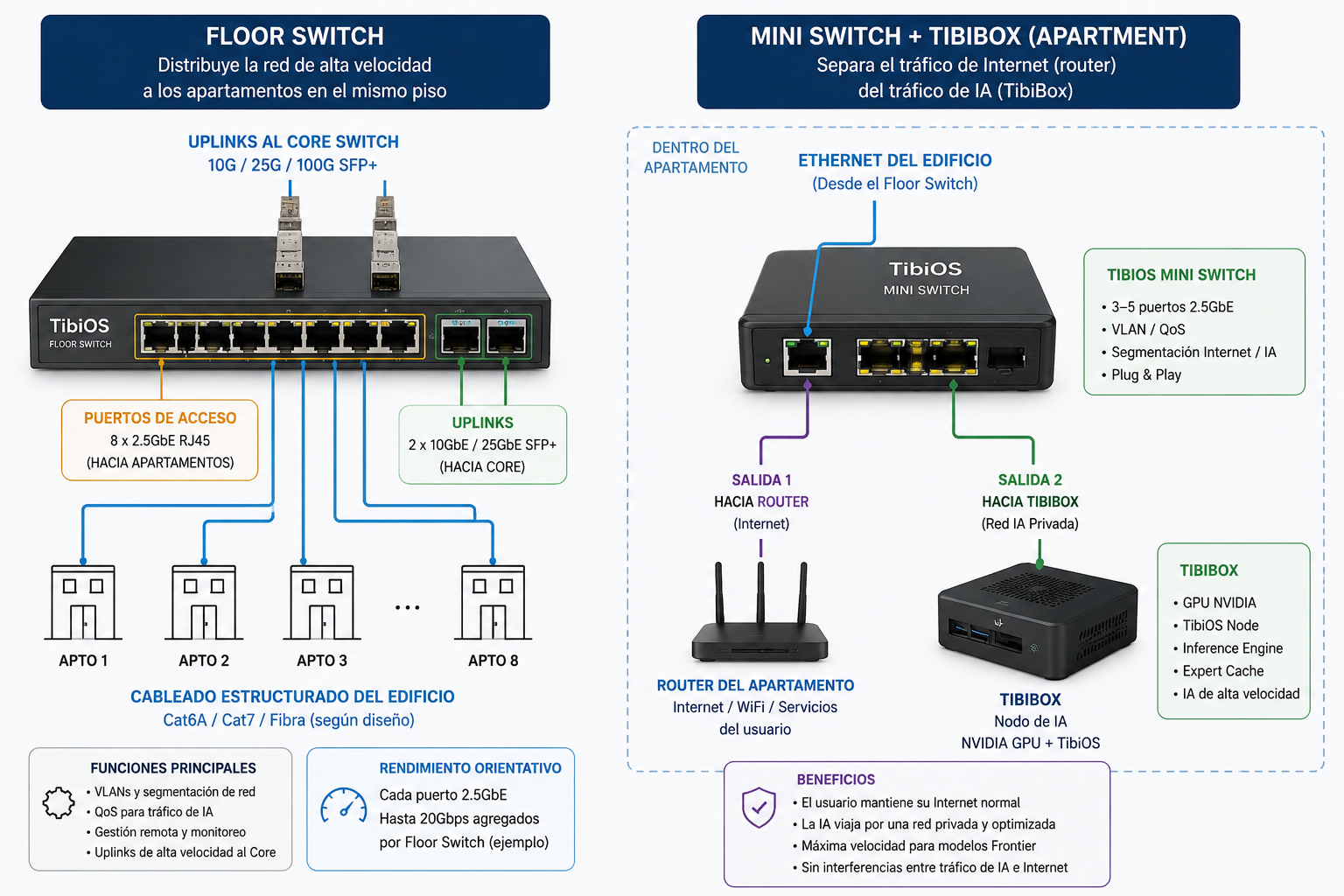
Cómo funciona
La infraestructura se divide en dos niveles principales:
1. TibiOS Floor Switch
El Floor Switch distribuye la red de alta velocidad desde el Core hacia los diferentes apartamentos de una planta. Cada apartamento puede disponer de una conexión 2.5GbE dedicada hacia el switch de planta.
El Floor Switch incorpora:
- 8 × puertos 2.5GbE RJ45 para los apartamentos
- 2 × uplinks SFP+ de 10/25GbE hacia el Core
- VLANs para segmentación de red
- QoS para priorizar el tráfico de IA
- Gestión y monitorización remota
- Conectividad de alta velocidad entre las diferentes zonas de la infraestructura
El cableado puede realizarse mediante Cat6A, Cat7 o fibra, dependiendo del diseño y de las distancias.
Como referencia, ocho conexiones de 2.5GbE representan hasta 20Gbps de tráfico agregado hacia el Floor Switch, aunque el rendimiento real dependerá de los uplinks, configuración de red y patrón de tráfico.
2. TibiOS Mini Switch dentro del apartamento
La conexión procedente del Floor Switch llega al apartamento mediante Ethernet de alta velocidad. En el apartamento se instala un TibiOS Mini Switch, que actúa como punto de separación entre la red convencional del usuario y la red privada de IA.
El Mini Switch puede proporcionar:
- 3–5 puertos 2.5GbE
- VLAN y/o QoS
- Separación entre tráfico de Internet y tráfico de IA
- Conexión Plug & Play
- Un puerto hacia el router del apartamento
- Uno o más puertos hacia TibiBoxes y nodos TibiOS
De esta forma, el usuario puede seguir utilizando normalmente su router, Wi-Fi, servicios de Internet y dispositivos personales mientras TibiOS utiliza una red privada independiente para la comunicación entre nodos.
Guía de instalación
- Paso 1 — Conectar el Floor Switch al Core. Instala el TibiOS Floor Switch en el armario o punto de distribución de la planta. Conecta sus uplinks SFP+ al Core Switch utilizando enlaces de 10GbE, 25GbE o la velocidad disponible en la infraestructura. Para instalaciones de mayor tamaño, pueden utilizarse enlaces redundantes o configuraciones específicas de agregación según el diseño de red.
- Paso 2 — Conectar los apartamentos. Conecta los puertos 2.5GbE del Floor Switch con los apartamentos mediante el cableado estructurado del edificio (Floor Switch → Apartamento 1, 2, 3… hasta 8). La infraestructura puede utilizar Cat6A/Cat7 o fibra según las necesidades del edificio.
- Paso 3 — Instalar el TibiOS Mini Switch. Dentro de cada apartamento, conecta el cable procedente del Floor Switch al puerto de entrada del TibiOS Mini Switch. El Mini Switch se convierte en el punto de distribución local de la red TibiOS.
- Paso 4 — Conectar el router del apartamento. Conecta una salida del Mini Switch al router del usuario. El router continúa proporcionando la conectividad habitual: Internet, Wi-Fi, servicios domésticos y dispositivos personales. El usuario no necesita cambiar su forma habitual de utilizar Internet.
- Paso 5 — Conectar la TibiBox. Conecta otro puerto del Mini Switch a la TibiBox, que funciona como nodo de la red privada TibiOS y puede incorporar GPU NVIDIA, TibiOS Node, motor de inferencia, Expert Cache y otros servicios de IA distribuidos. Los nodos TibiOS conectados a la infraestructura privada pueden comunicarse entre sí sin utilizar la conexión pública a Internet.
Segmentación de la red
La separación lógica de las redes se realiza mediante VLANs y políticas de QoS, según la configuración del despliegue. La arquitectura mantiene separados el dominio de Internet (router, Wi-Fi y servicios convencionales del usuario) y el dominio de la TibiOS Private Network (comunicación entre TibiBoxes, nodos de inferencia y otros componentes de la infraestructura de IA).
Esto evita que una descarga, streaming o cualquier otra actividad normal de Internet consuma innecesariamente el ancho de banda destinado a la comunicación entre nodos TibiOS.
Ventajas
- Alta velocidad: la infraestructura puede utilizar enlaces de 2.5GbE, 10GbE, 25GbE o superiores, permitiendo construir redes adecuadas para cargas de IA distribuidas.
- Baja latencia: el tráfico entre nodos puede mantenerse dentro de la red privada, evitando depender de Internet para la comunicación interna.
- Separación de tráfico: Internet y tráfico de IA pueden funcionar de forma independiente.
- Escalabilidad: la arquitectura puede crecer desde un único apartamento hasta múltiples plantas y múltiples TibiBoxes.
- Preparada para IA distribuida: la red proporciona la infraestructura necesaria para conectar nodos TibiOS que participen en cargas distribuidas, incluyendo inferencia, comunicación entre nodos y distribución de modelos o Experts.